ESP8266 I2C LCD Display
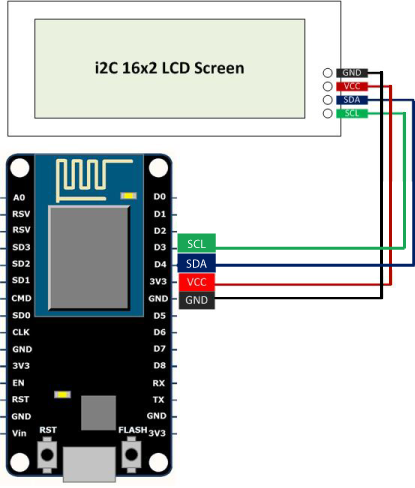
This simple DIY project demonstrates how to connect an ESP8266 microcontroller to a 16×2 I2C LCD display and print a message.
It uses the Wire and LiquidCrystal_I2C libraries to initialize and control the LCD.
Components Required
- ESP8266 (NodeMCU or ESP‑01)
- 16×2 I2C LCD display
- Jumper wires
- Breadboard (optional)
Wiring (ESP8266 → LCD)
| LCD SDA | GPIO2 (D4) |
| LCD SCL | GPIO0 (D3) |
| VCC | 3.3V – 5V (LCD supports both) |
| GND | GND |
Code Example
Hello World on LCD
#include <Wire.h>
#include <LiquidCrystal_I2C.h>

LiquidCrystal_I2C lcd(0x27, 16, 2); // LCD address and size

void setup() {
  Wire.begin(2, 0);        // SDA = GPIO2, SCL = GPIO0
  lcd.init();              // Initialize LCD
  lcd.backlight();         // Turn on backlight
  lcd.print(" Hello World! ");
}

void loop() {
  // Nothing here
}
The LCD address 0x27 is common, but some displays use 0x3F.
Output
Hello World!